Auto Top-up
Auto top-up is Credyt’s mechanism for keeping prepaid balances funded automatically, so usage-based products can run without interruption.
It enables your customers to define simple rules that trigger a top-up whenever their balance drops below a certain threshold. Instead of relying on manual action at the exact moment a balance runs out, auto top-up ensures continuity for long-running or unpredictable workloads.
This feature is essential for platforms that bill in real time, where usage can fluctuate rapidly, and a depleted balance could interrupt an in-progress task, degrade the user experience, or lead to unexpected churn.
How auto top-up works in Credyt
Auto top-up is configured by your customers directly in the Billing Portal and applied per asset (e.g., USD, credits, tokens, or minutes). In its current form, auto top-up is available to platforms using Credyt’s built-in payment processing, powered by Stripe’s payments infrastructure.
For each asset, a customer can:
- Enable or disable auto top-up
- Choose a saved payment card or add a new one
- Define a balance threshold
- Define a top-up amount
When the balance for a given asset drops below the configured threshold, Credyt automatically initiates an off-session payment via Stripe and credits the wallet once the payment succeeds.
This happens without interrupting the customer’s workflow and without requiring any manual action when the balance runs low.
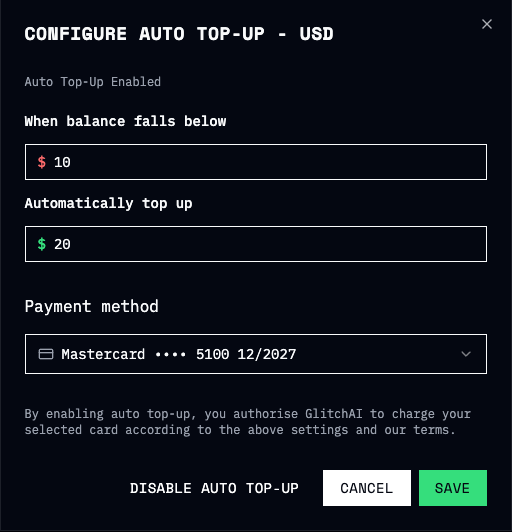
Per-asset configuration
Auto top-up is asset-specific by design.
Each wallet asset has its own independent auto top-up configuration. This allows customers to treat different balances independently, which is especially useful for products that combine multiple billing models or usage units.
All saved payment cards belong to the customer account and are available across all asset configurations.
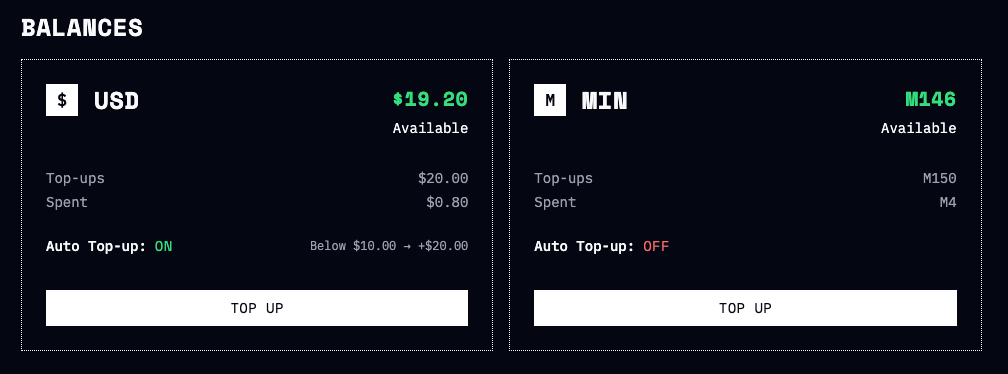
Card management and authorisation
Auto top-up relies on payment cards explicitly authorized by the end customer for future use.
Card authorisation can happen in two ways:
- When a customer adds a new card through the Billing Portal
- When a customer completes a manual top-up and consents to saving the card for future use
All card authorization flows, including any required authentication steps, are handled through Stripe’s secure payment infrastructure.
The selection or change of the payment card used for auto top-up is performed exclusively by the end customer within the Billing Portal. Platforms redirect customers to the portal but do not directly control card selection.